head(cars) speed dist
1 4 2
2 4 10
3 7 4
4 7 22
5 8 16
6 9 10There are lot’s of ways to make figures in R. These include so-called “base R” graphics (e.g. plot()) and tones of add-on packages like ggplot2.
For example here we make the same plot with both:
head(cars) speed dist
1 4 2
2 4 10
3 7 4
4 7 22
5 8 16
6 9 10plot(cars)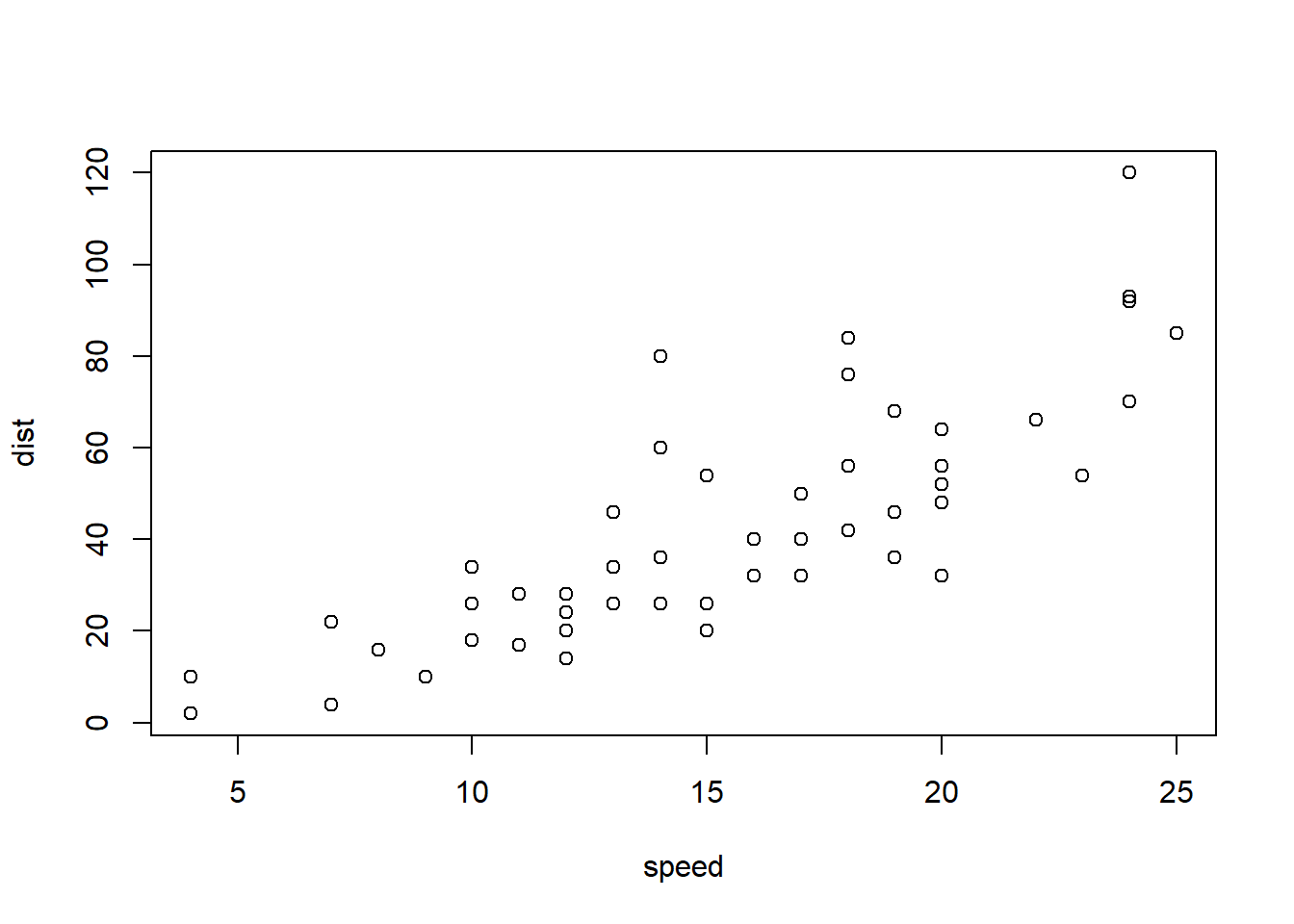
First I need to install the package with the command install.packages()
N.B. We never run an install cmd in a quarto code chunk or we will end up re-installing packages many many times - which is not what we want!
Every time we want to use one of these “add-on” packages we need to load it up in R with the library() function:
library(ggplot2)ggplot(cars)
Every ggplot needs at least 3 things:
ggplot(cars) +
  aes(x=speed, y=dist) +
  geom_point()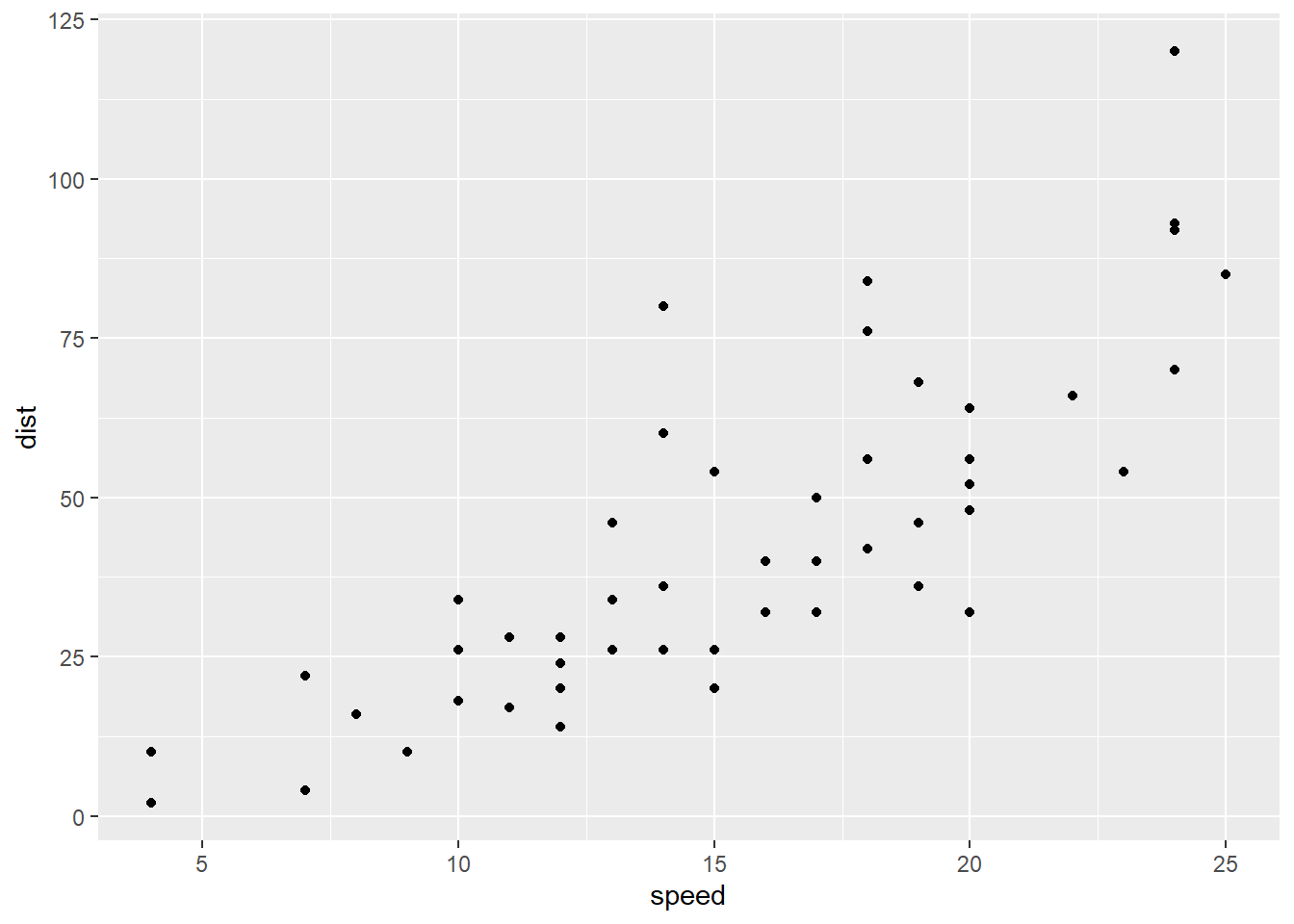
Add a line to better show relationship between speed and dist
p <- ggplot(cars) +
  aes(x=speed, y=dist) +
  geom_point() +
  geom_smooth(method="lm", se=FALSE) +
  labs(title="Stopping distance of old cars", subtitle = "Data from the `cars` object", x="Speed (mph)", y="Distance (ft)")
render it out
p`geom_smooth()` using formula = 'y ~ x'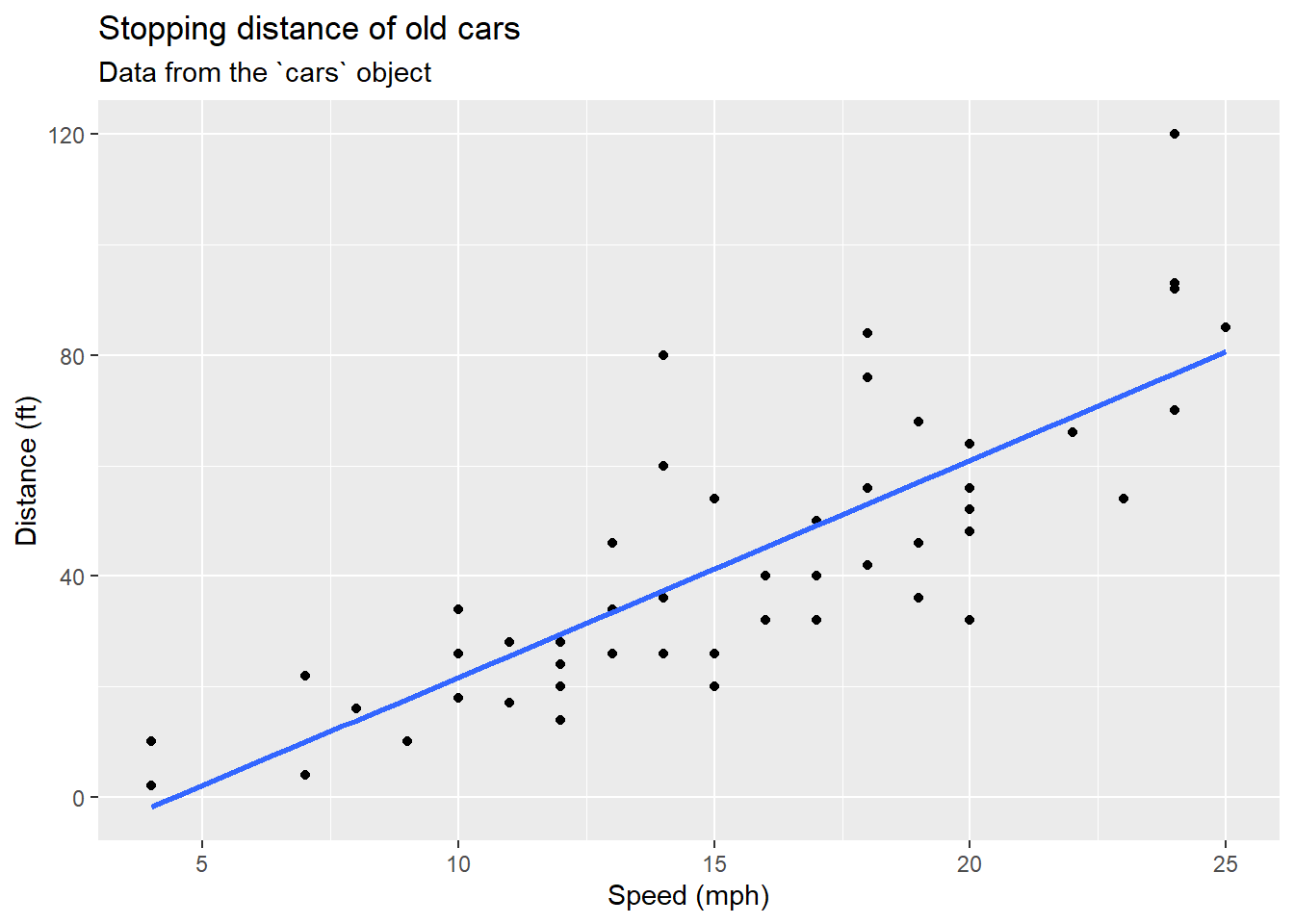
p + theme_bw()`geom_smooth()` using formula = 'y ~ x'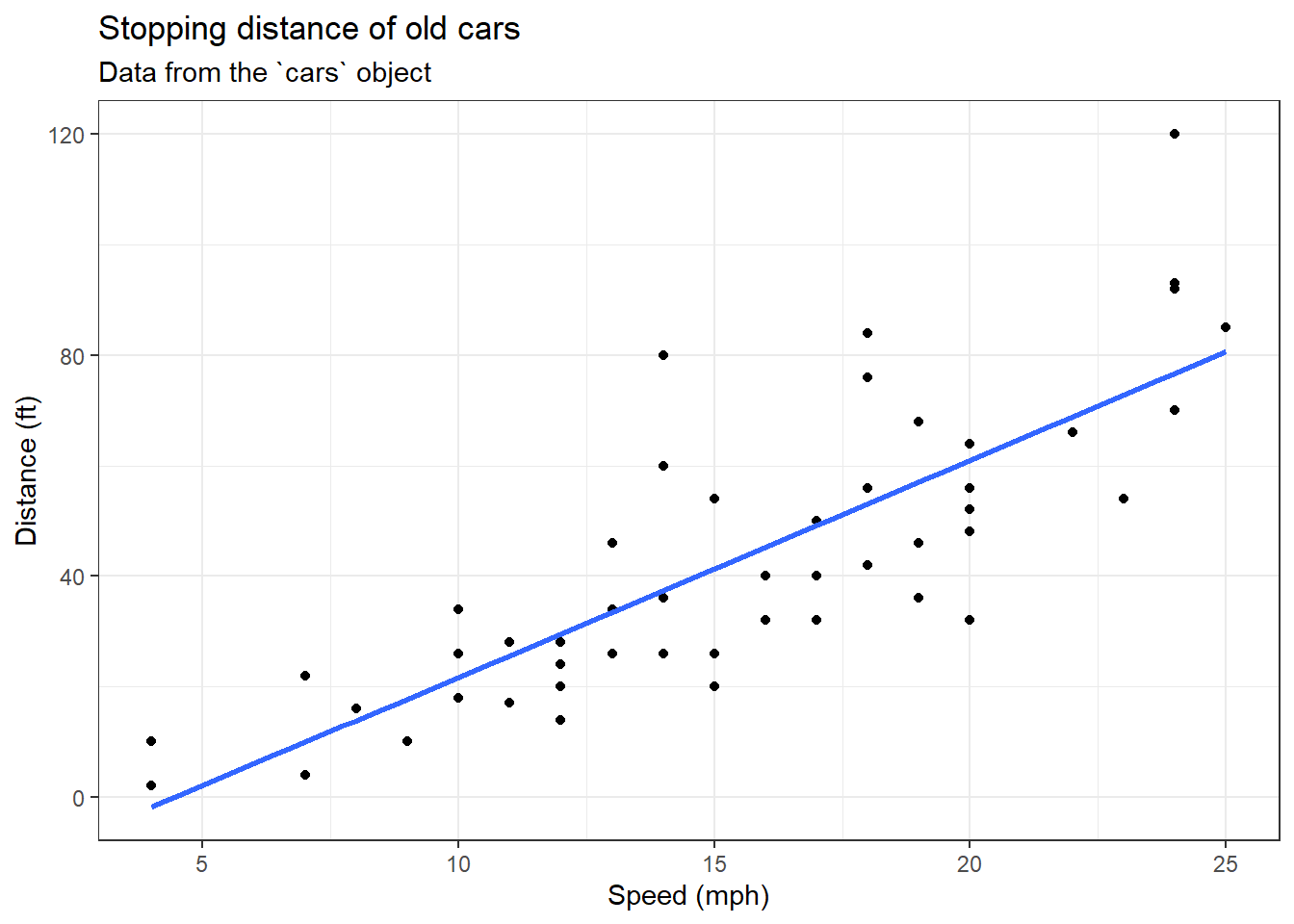
We can read the input data from the class website
url <- "https://bioboot.github.io/bimm143_S20/class-material/up_down_expression.txt"
genes <- read.delim(url)
head(genes)
Gene Condition1 Condition2 State
1 A4GNT -3.6808610 -3.4401355 unchanging
2 AAAS 4.5479580 4.3864126 unchanging
3 AASDH 3.7190695 3.4787276 unchanging
4 AATF 5.0784720 5.0151916 unchanging
5 AATK 0.4711421 0.5598642 unchanging
6 AB015752.4 -3.6808610 -3.5921390 unchangingA first version plot
ggplot(genes) +
  aes(Condition1, Condition2) +
  geom_point()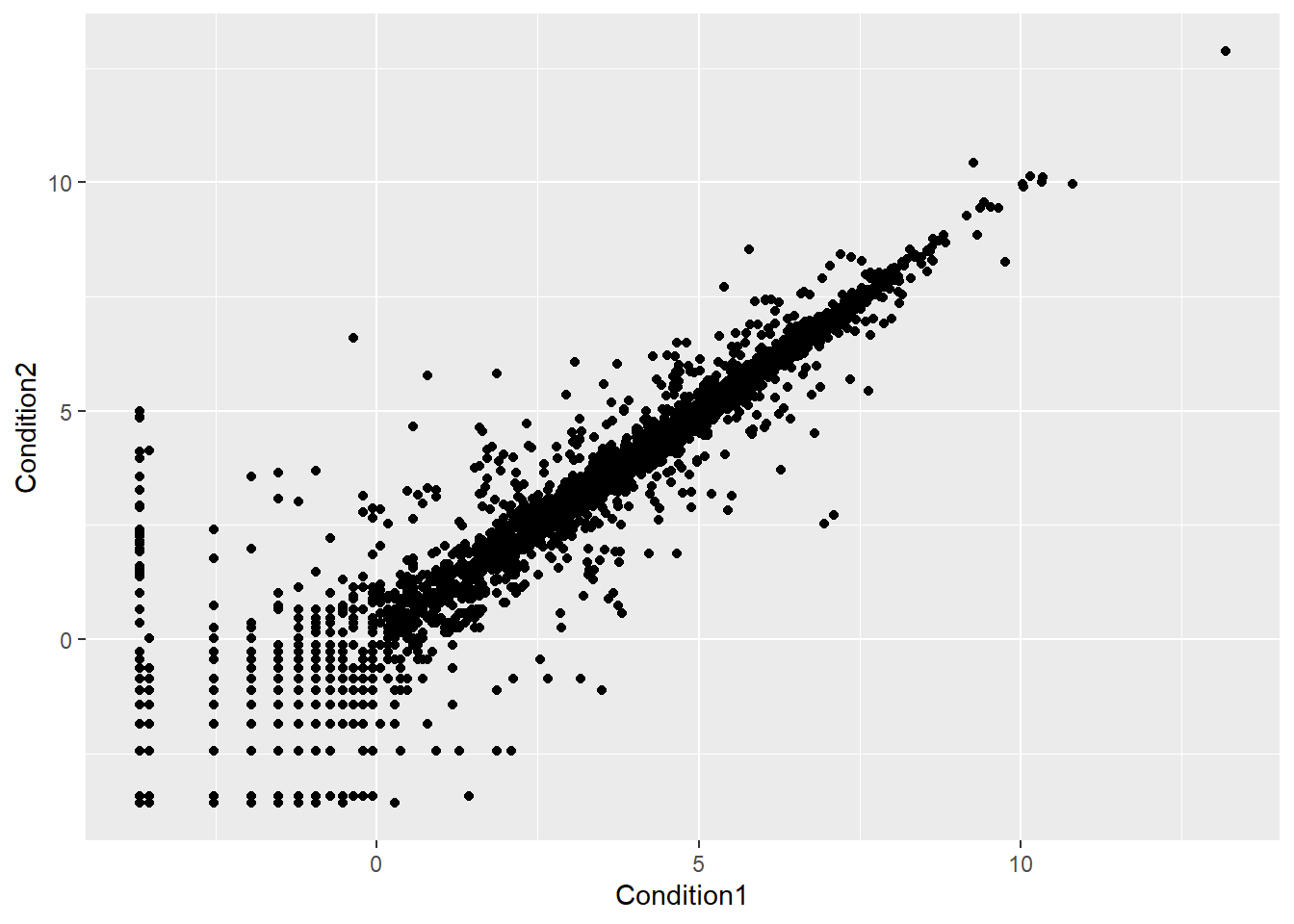
table(genes$State)
      down unchanging         up
        72       4997        127
Version 2 let’s color by State so we can see the “up” and “down” significant genes compared to all the “unchanging” genes
ggplot(genes) +
  aes(Condition1, Condition2, col=State) +
  geom_point()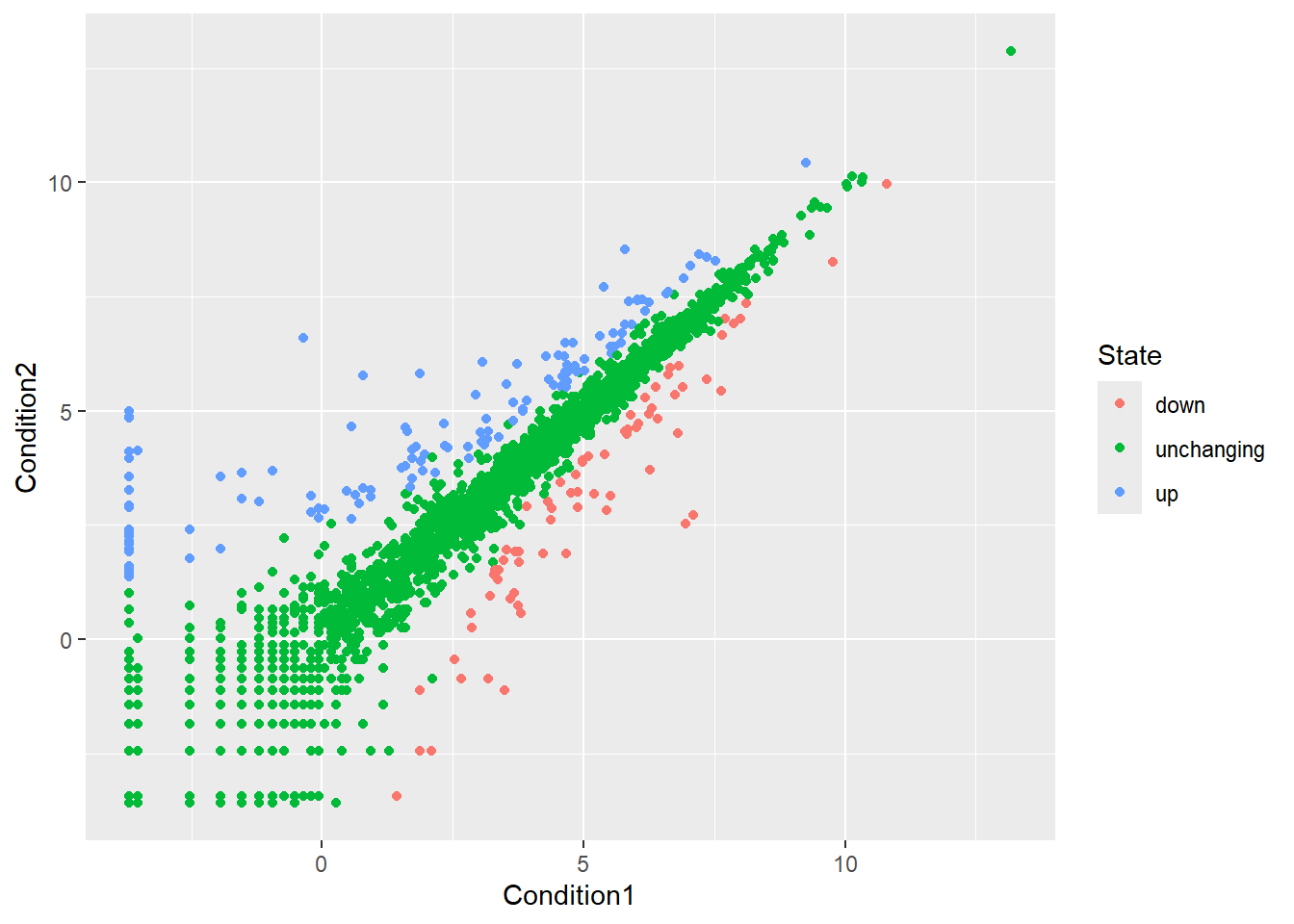
Version 3 plot, let’s modify the default colors to something we like
ggplot(genes) +
  aes(Condition1, Condition2, col=State) +
  geom_point() +
  scale_colour_manual( values=c("orange", "gray", "purple")) +
  labs(x="Control (no drug)", y="Drug", title="Gene Expression Changes upon GLP-1 drug") +
  theme_bw()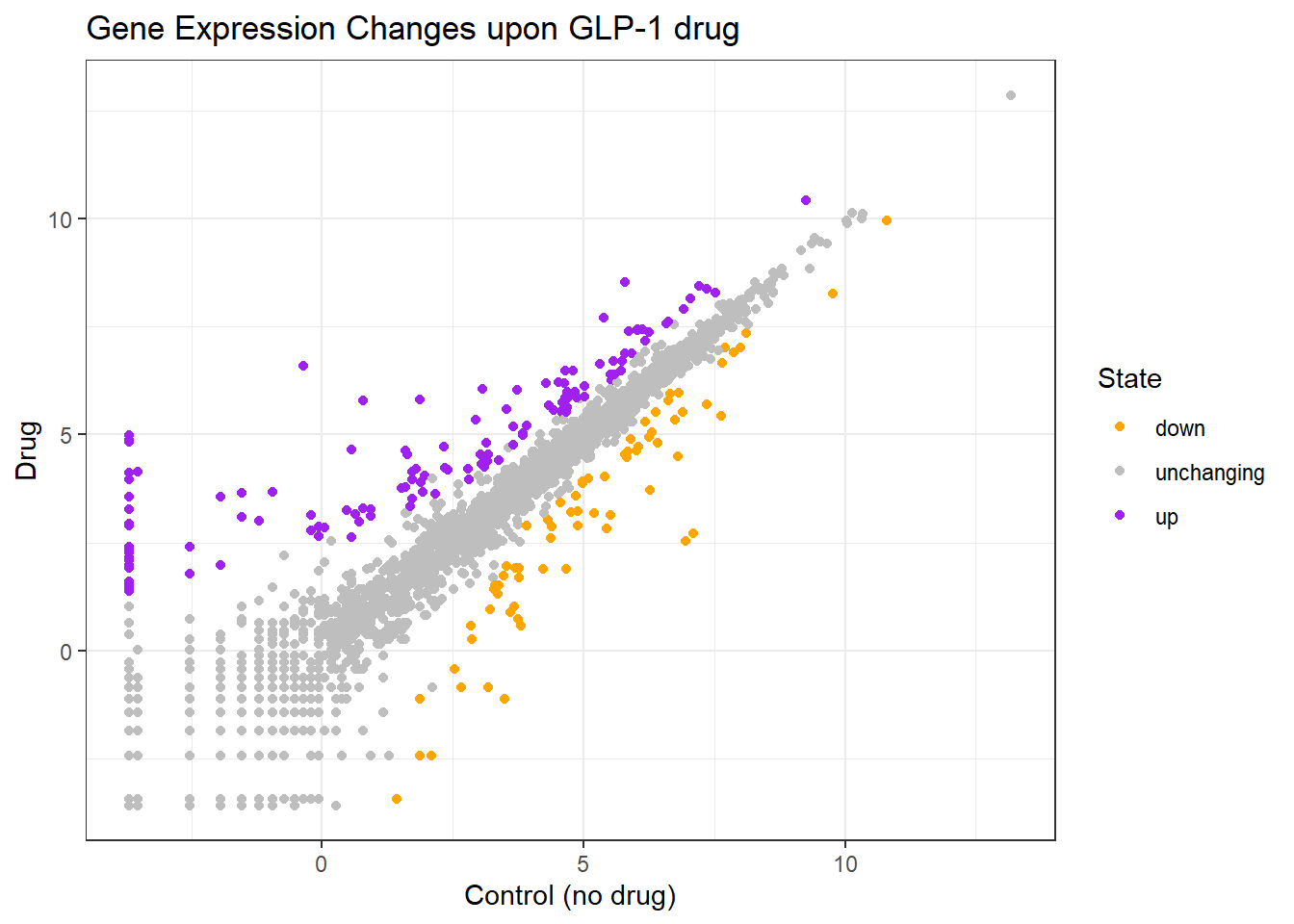
Let’s have a look at the famous gapminder
# File location online
url <- "https://raw.githubusercontent.com/jennybc/gapminder/master/inst/extdata/gapminder.tsv"

gapminder <- read.delim(url)head(gapminder, 3) country continent year lifeExp pop gdpPercap
1 Afghanistan Asia 1952 28.801 8425333 779.4453
2 Afghanistan Asia 1957 30.332 9240934 820.8530
3 Afghanistan Asia 1962 31.997 10267083 853.1007ggplot(gapminder) +
aes(gdpPercap, lifeExp, col=continent) +
geom_point(alpha=0.3)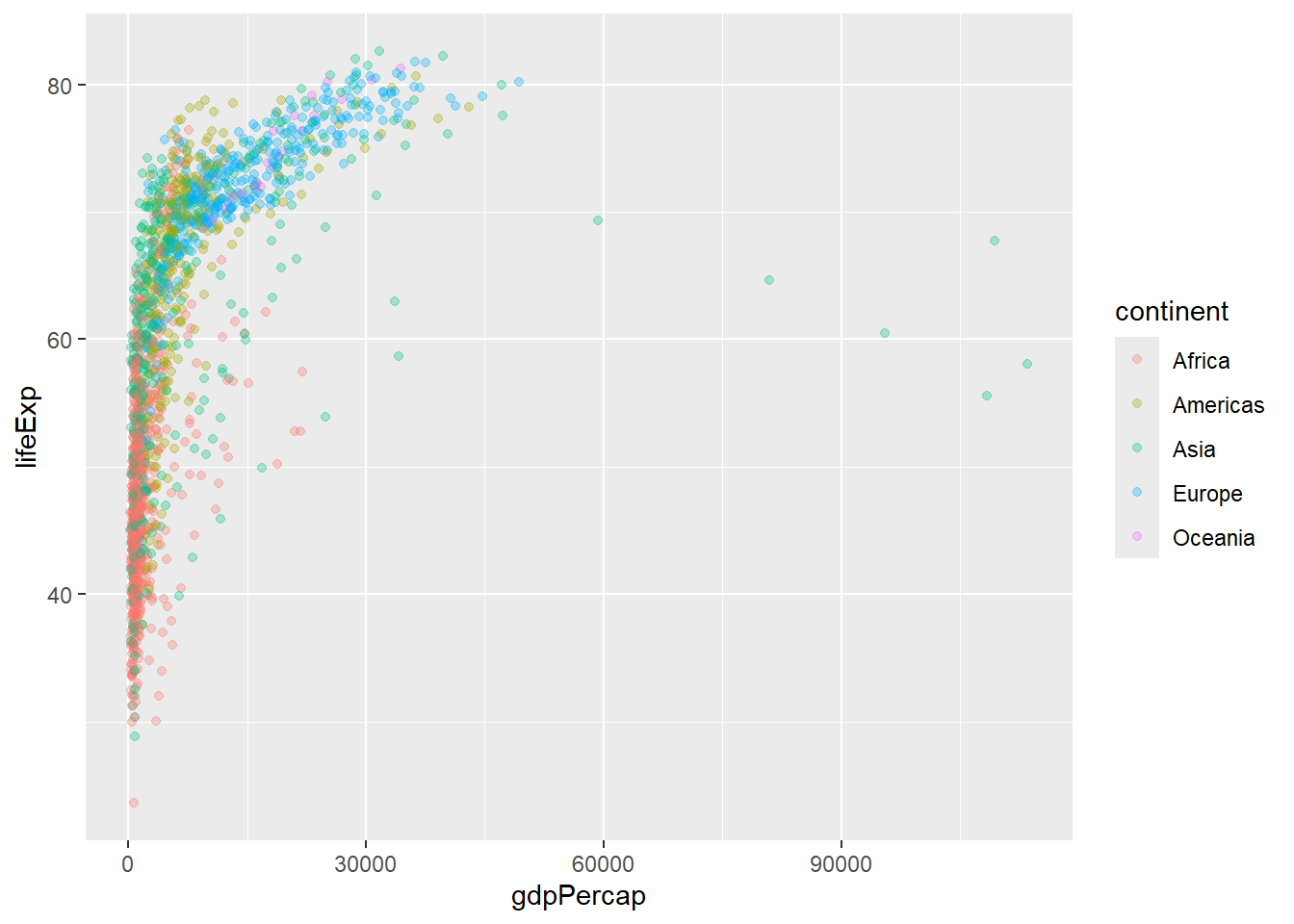
Let’s “facet” (i.e. make a separate plot) by continent rather than the big hot mess above.
ggplot(gapminder) +
  aes(gdpPercap, lifeExp, col=continent) +
geom_point(alpha=0.3) +
facet_wrap(~continent)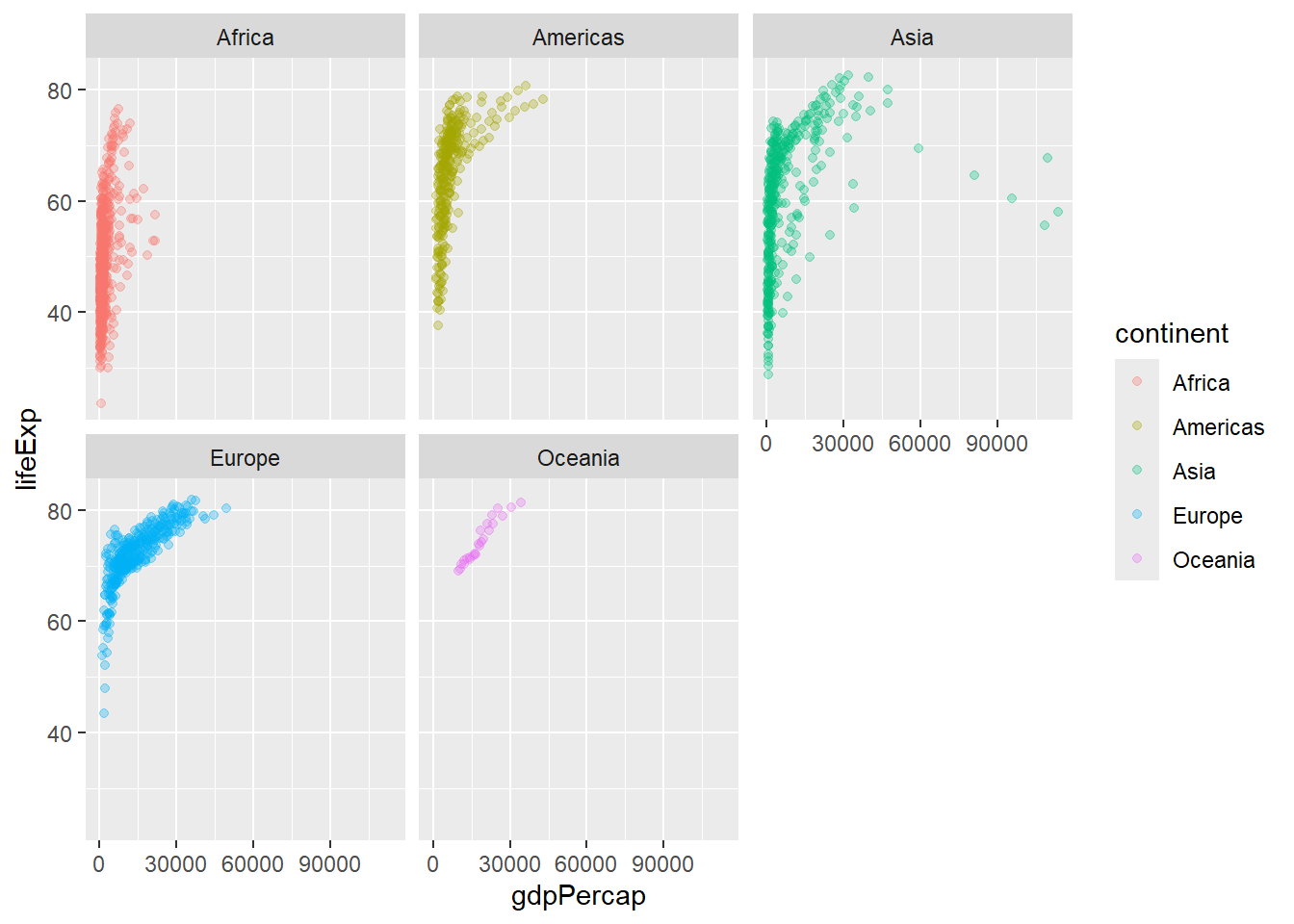
How big is this gapmider dataset?
nrow(gapminder)[1] 1704I want to “filter” down to a subset of this data. I will use the dplyr package to help me.
First I need to install it and then load it up… install-packages("dplyr") and then library(dylyr)
library(dplyr)
Attaching package: 'dplyr'The following objects are masked from 'package:stats':
filter, lagThe following objects are masked from 'package:base':
intersect, setdiff, setequal, uniongapmider_2007 <- filter(gapminder, year==2007)
head(gapmider_2007) country continent year lifeExp pop gdpPercap
1 Afghanistan Asia 2007 43.828 31889923 974.5803
2 Albania Europe 2007 76.423 3600523 5937.0295
3 Algeria Africa 2007 72.301 33333216 6223.3675
4 Angola Africa 2007 42.731 12420476 4797.2313
5 Argentina Americas 2007 75.320 40301927 12779.3796
6 Australia Oceania 2007 81.235 20434176 34435.3674filter(gapmider_2007, country=="Ireland") country continent year lifeExp pop gdpPercap
1 Ireland Europe 2007 78.885 4109086 40676filter(gapminder, year==2007, country=="Ireland") country continent year lifeExp pop gdpPercap
1 Ireland Europe 2007 78.885 4109086 40676filter(gapminder, year==2007, country=="United States") country continent year lifeExp pop gdpPercap
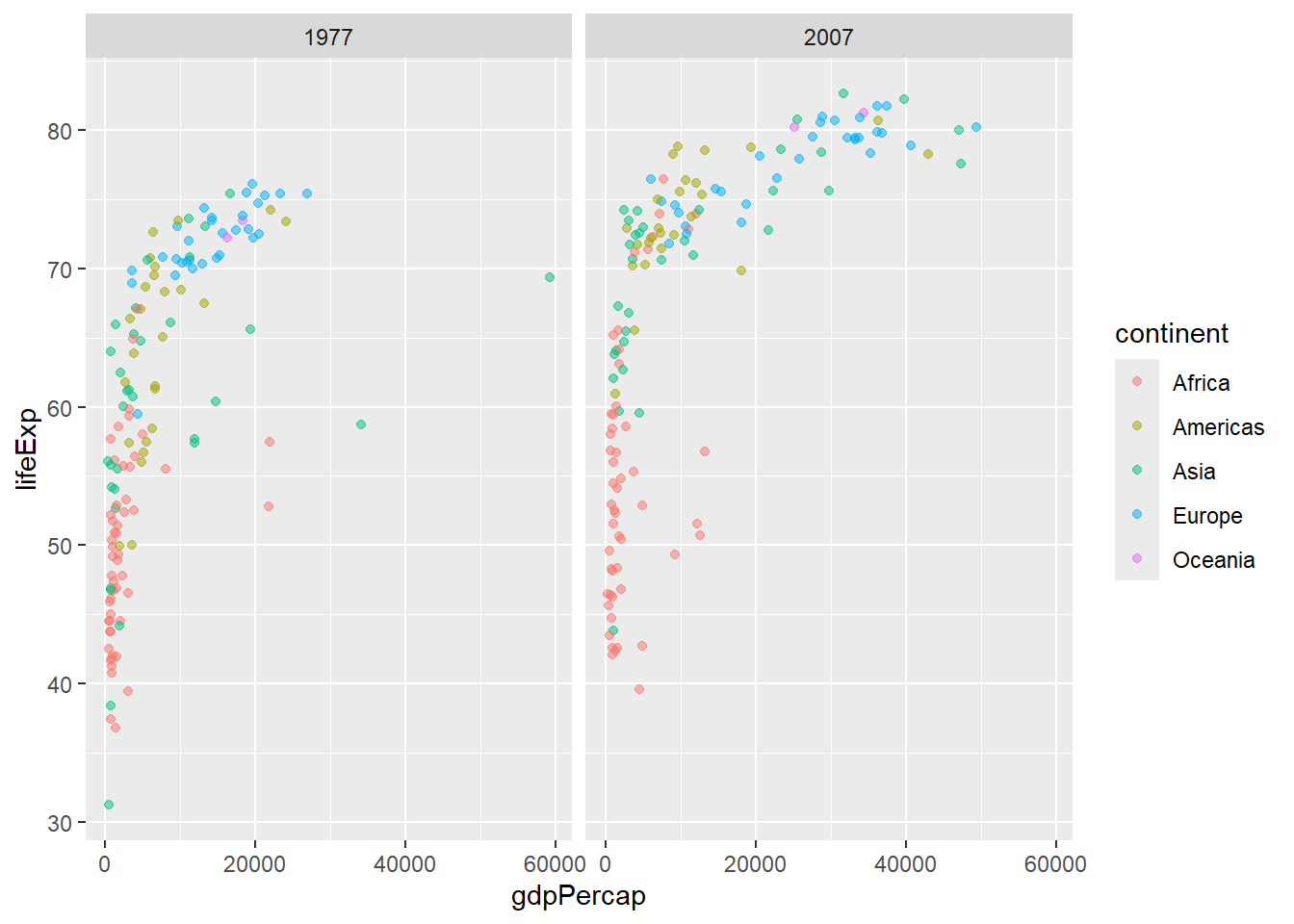
1 United States Americas 2007 78.242 301139947 42951.65Q. Make a plot comparing 1977 and 2007 for all countries
input <- filter(gapminder, year %in% c(1977, 2007))
head(input)
country continent year lifeExp pop gdpPercap
1 Afghanistan Asia 1977 38.438 14880372 786.1134
2 Afghanistan Asia 2007 43.828 31889923 974.5803
3 Albania Europe 1977 68.930 2509048 3533.0039
4 Albania Europe 2007 76.423 3600523 5937.0295
5 Algeria Africa 1977 58.014 17152804 4910.4168
6 Algeria Africa 2007 72.301 33333216 6223.3675ggplot(input) +
aes(gdpPercap, lifeExp, col=continent) +
geom_point(alpha=0.5) +
facet_wrap(~year)